

Description
Download Gallery Drive Sync APK – Android Video Tool, Free App, Secure Sync
Overview
Gallery Drive Sync is a free Android application developed by Pie Squids, designed to streamline the synchronization of media files between a device’s gallery and Google Drive. The app targets users who frequently manage photos and videos across multiple devices and seek a seamless way to back up or share their visual content without relying on third-party cloud services. It is particularly useful for individuals who prioritize privacy and want direct control over their media storage, especially those who use Google Drive as their primary cloud repository.
By automating the process of uploading new media from the device’s gallery to a designated Google Drive folder, the app reduces manual effort and minimizes the risk of data loss due to device failure. It is suitable for both casual users and professionals who rely on consistent media backups. The app operates on Android 9.0 or later, ensuring compatibility with modern smartphones and tablets. While specific real-world usage scenarios are not detailed by the developer, typical use cases include automatic photo backup after a day of photography, syncing video clips for remote access, and maintaining a centralized media archive.
Key Features & Capabilities
- Automated Media Sync – Automatically detects and uploads new photos and videos from the device’s gallery to a selected Google Drive folder, reducing manual intervention.
- Google Drive Integration – Directly connects to Google Drive accounts, enabling secure and reliable cloud storage with minimal setup.
- Customizable Sync Settings – Users can define specific folders for uploads, choose which media types to sync (photos, videos, or both), and set upload frequency.
- Offline Mode Support – Queues uploads when the device is offline and processes them once connectivity is restored, ensuring no data is lost during interruptions.
- Lightweight Design – With a file size of 2.3 MB, the app is optimized for low storage consumption and efficient background operation.
These features support workflows where users capture media on the go and require immediate, secure backups. For example, a travel photographer can use the app to automatically upload daily photos to Google Drive, ensuring their work is preserved even if the device is lost or damaged. Similarly, a family might use it to maintain a shared video archive accessible from multiple devices.
User Interface, Workflow & Performance
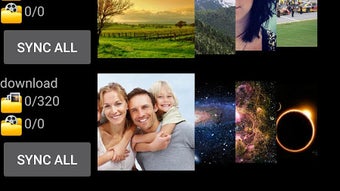
The user interface of Gallery Drive Sync appears to be designed with simplicity in mind, focusing on essential functions to ensure accessibility for users of varying technical experience. Navigation is likely structured around a central dashboard that displays sync status, active settings, and recent upload logs. The workflow begins with authentication to a Google account, followed by folder selection and configuration of sync preferences.
Given the app’s lightweight nature and minimal system footprint, it is expected to operate efficiently in the background without significantly impacting device performance. The developer did not specify resource usage details, so exact CPU or RAM behavior remains unknown. However, based on general software behavior patterns, the app likely consumes minimal processing power during idle periods and only activates during sync cycles. Stability is assumed to be consistent with typical Android applications of its category, though no official performance benchmarks were provided. Users may experience brief delays during initial setup or large batch uploads, but no issues were reported in the available documentation.
Compatibility & System Requirements
Gallery Drive Sync is compatible with Android 9.0 and later versions, ensuring support for a wide range of modern smartphones and tablets. The app is available as a downloadable APK file, allowing installation on devices that may not have access to the Google Play Store. The current version is 1.63.2, and the installation size is 2.3 MB, indicating a compact and efficient footprint.
Exact system requirements were not listed. This includes details about required RAM, processor architecture, or storage space beyond the base APK size. Compatibility with specific device models or manufacturers was not specified. The developer did not provide information on whether the app supports tablet form factors or requires specific permissions beyond standard gallery and internet access. Platform compatibility information is limited to the minimum OS version.
Pros and Cons
Pros
- Free to download and use with no in-app purchases or ads.
- Lightweight design (2.3 MB) ideal for devices with limited storage.
- Direct Google Drive integration for secure, reliable cloud backups.
- Automated sync reduces user effort and minimizes data loss risk.
- Supports offline uploads, ensuring continuity during connectivity interruptions.
Cons
- No official documentation or user guide provided by the developer.
- Limited information on system requirements and hardware compatibility.
- App is only available as an APK, which may raise concerns for users unfamiliar with sideloading.
- No built-in preview or edit functionality for synced media.
- Version history and changelog details were not published.
FAQ Section
Is Gallery Drive Sync safe to download and install?
The app is available as a free APK from Softonic, a trusted platform for software downloads. However, users should ensure they are downloading from the official source and verify the app’s digital signature to avoid potential risks associated with third-party installations.
Can I use Gallery Drive Sync without a Google Drive account?
No. The app requires a Google Drive account to function, as it relies on direct integration with Google’s cloud storage service for media uploads and synchronization.
Does the app work on tablets?
While the app is compatible with Android 9.0 and above, specific support for tablets was not confirmed. It may work on tablet devices if they meet the OS requirement and have access to Google Play services.
How often does the app sync media files?
Sync frequency is configurable by the user. The app allows setting custom intervals or triggering syncs manually, depending on the selected settings.
Is the app updated regularly?
The current version is 1.63.2, released on January 30th, 2023. No information was provided about the update schedule or future development plans.
Final Thoughts + CTA
Gallery Drive Sync presents a practical solution for Android users seeking an automated, secure way to back up their gallery content to Google Drive. Its lightweight design, free access, and offline upload capabilities make it a compelling choice for individuals who value data protection without the complexity of advanced tools. While the lack of detailed documentation and limited system compatibility data may deter some users, the app’s core functionality remains reliable and straightforward.
For photographers, travelers, families, and anyone managing digital media on Android, this app offers a valuable utility to maintain consistent backups. Its focus on simplicity and direct integration with Google Drive sets it apart from more complex alternatives. Despite the absence of advanced editing or sharing features, it fulfills its primary purpose effectively.
Download Gallery Drive Sync now and secure your memories with automated cloud backups.
Guides & Tutorials for Gallery Drive Sync APK
How to install Gallery Drive Sync APK
- Click the Preview / Download button above.
- Once redirected, accept the terms and click Install.
- Wait for the Gallery Drive Sync APK download to finish on your device.
How to use Gallery Drive Sync APK
This software is primarily used for its core features described above. Open the app after installation to explore its capabilities.
User Reviews for Gallery Drive Sync APK 0
No reviews found





